
CX tech stack consolidation seems like the obvious way to cut costs and make life easier: fewer applications, fewer integrations, perhaps one provider handling everything from customer service to AI. But the right CX architecture isn’t always the one with the fewest vendors on your books.
TalkTalk wanted rid of 12 contact center applications. Pets at Home made a different call, deliberately keeping its retail, veterinary, and insurance operations out of one enormous Salesforce instance. Both had good reasons. So why do so many vendors talk as though everybody should be heading toward the same architecture?
Too many consolidation pitches start with a promise to cut the software bill, before anyone’s checked whether the replacement can handle your busiest site’s scheduling rules, or what happens to customer records when an integration fails. A cheaper contract is wonderful. Spending three years compensating for features you’ve lost isn’t so fun.
The choice between a unified platform, specialist tools, and composable architecture comes down to what you actually need, what your team can support, and how much control you’re willing to give up.
Key Takeaways
-
Don’t consolidate your CX stack until you know which applications you can actually afford to lose.
-
Native suite features deserve proper testing against the specialist products they’d replace.
-
Composable CX architecture gives you more choice, along with more technical responsibility.
-
CX stack integration needs an owner. When customer records stop syncing, whose problem is it?
-
Before choosing, test the awkward workflows, check your exit options, and get the real operating costs.
Consolidate the things that are genuinely duplicated, integrate the things that work, and don’t let a procurement saving decide an architecture question.
Why Fragmented CX Stacks Are Costing Businesses Too Much
It starts with reasonable purchases: marketing needs better feedback tools, the contact center wants a new platform, IT approves another AI application. A year later the bill keeps growing and agents still can’t find basic customer information.
Puzzel’s State of Contact Centres 2026 survey found that contact centers use an average of 3.9 platforms, while 50% of respondents said multiple vendors increased maintenance and support costs. Those figures come from 1,505 European CX professionals, rather than audited spending.
Kevin McNulty, Senior Director of Product and Industry Marketing at Talkdesk, explained the problem to us before:
“Tech stack complexity is the natural byproduct of years of buying point-solutions through urgency and not strategic thinking.”
Subscriptions are only part of the frankenstack bill. Businesses also pay to maintain APIs, train employees across interfaces, and reconcile conflicting reports, while customers repeat information that’s already sitting somewhere in the business.
The National Residential Landlords Association is an interesting example: after consolidating its contact channels with Puzzel, average email response times fell from 35 hours to five, and call waits dropped 35%. Those are vendor-reported and came with routing and workflow changes, so consolidation alone can’t take the credit.
The answer to fragmentation is really figuring out which issues in your technology stack are causing the biggest problems, and starting there.
Single Platform, Best-of-Breed or Composable: What’s the Difference?
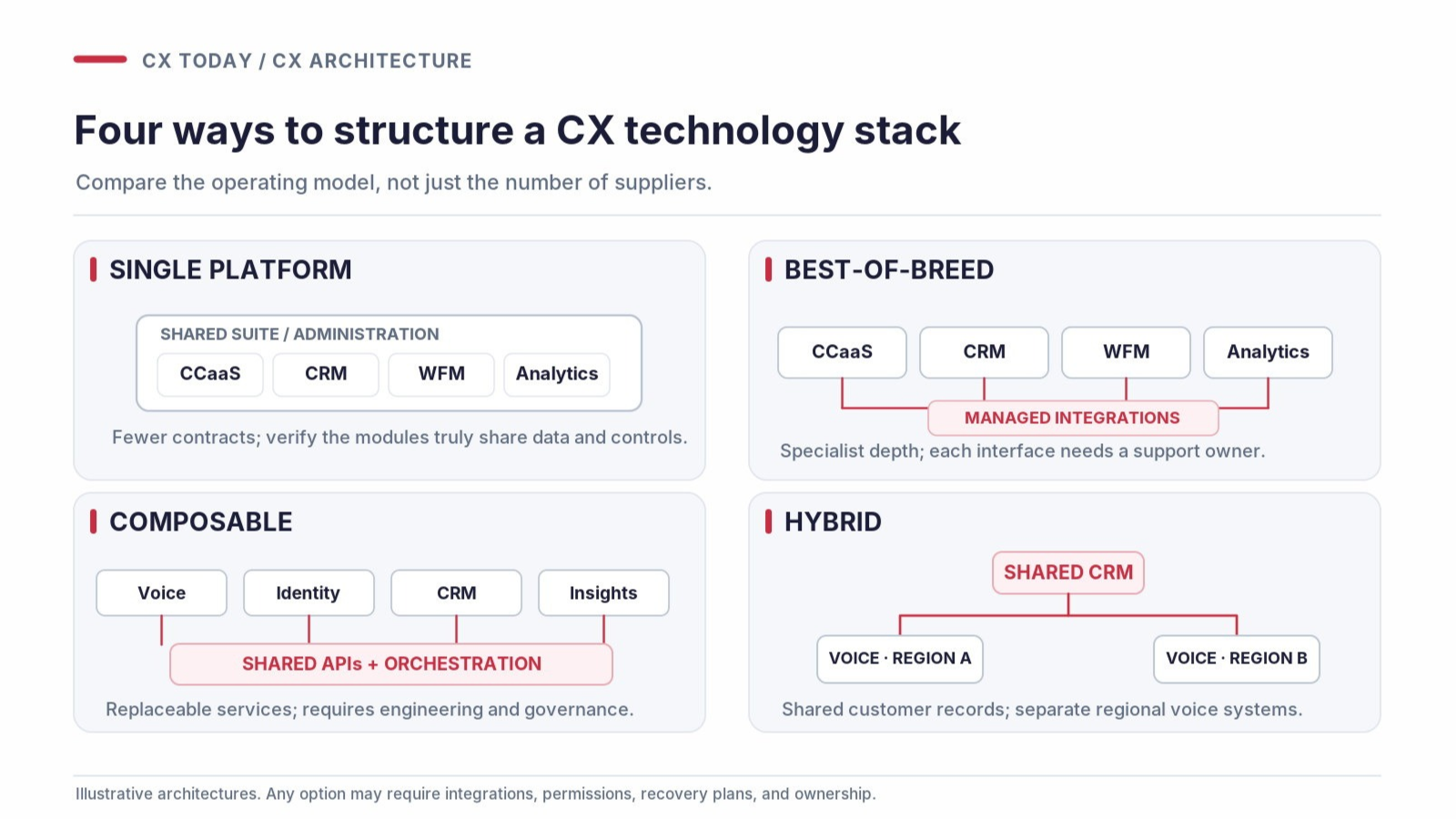
Vendors have different ideas about what a unified CX platform looks like, as a glance at the latest Magic Quadrants shows: everything under one roof, or integrations and replaceable components. I’d be more interested in where customer data lives, who maintains the connections, and how hard it is to change providers.
Single Platform: How Much Are You Actually Getting?
A single suite can bring CCaaS, CRM, reporting, and workforce tools under shared administration, with fewer contracts and support headaches. Check how much is genuinely native, though. Acquired products can keep separate databases, permissions, and consoles, and if you’re still maintaining five environments, what exactly have you consolidated?
Best-of-Breed: Is the Specialist Worth the Extra Work?
Best-of-breed CX means choosing individual applications for their strengths, like a specialist WFM tool with forecasting your suite can’t match. You’ll pay to maintain more connections and suppliers, but replacing valuable functionality with an inferior native module can cost far more.
Composable CX Architecture: Who’s Going to Manage It?
The appeal of composable CX architecture is that businesses can replace individual capabilities without tearing everything apart. APIs, shared services, and orchestration provide that freedom, assuming IT can keep the whole arrangement working. Best-of-breed concerns which products you use, while composable concerns how they’re connected. They fit together perfectly well.
|
Architecture |
What it does well |
Main concern |
Best suited to |
What to verify |
|---|---|---|---|---|
|
Single platform |
Shared administration and workflows |
Feature gaps and supplier dependence |
Standardized operations |
Shared identity, reporting, WFM, and QA |
|
Best-of-breed |
Specialist functionality |
Integration and support costs |
Complex or regulated workflows |
Data flows and ownership |
|
Composable |
Replaceable capabilities |
Engineering workload |
Technically mature teams |
APIs, portability, and recovery |
Dr. Martens shows why a hybrid approach usually makes sense. In a September 2026 interview with us, technology chief Graham Calder described its previous architecture:
“We were as fragmented as you could get.”
The company consolidated Salesforce Service Cloud into one global instance but kept two Amazon Connect environments to manage regional voice latency. Identical arrangements make little sense when requirements genuinely differ.
A warehouse-centric approach, sharing governed customer data across separate applications, can sit under any of these architectures, though you still manage permissions and how quickly data reaches operational systems. And a shared warehouse doesn’t guarantee comparable reports; check how CCaaS, CRM, and workforce data join up in customer analytics.
Should You Consolidate Your CX Stack? Six Questions to Ask First
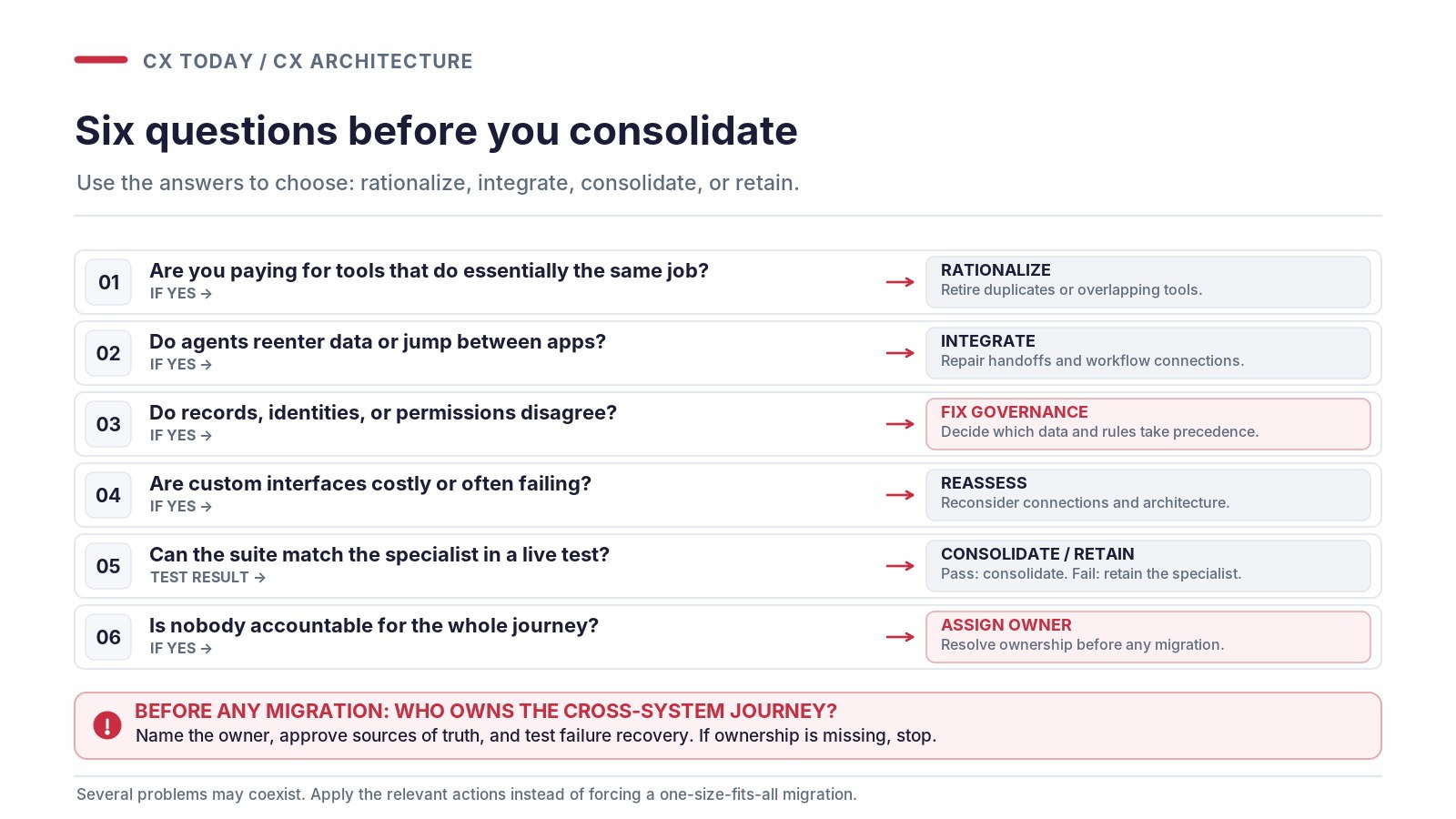
You can have six CX applications that work beautifully together, or two that make agents want to throw their headsets across the room. Counting vendors tells you little, so before funding another migration, get the people living with the problems to answer six questions.
The Six-Question CX Stack Consolidation Test
|
Question |
What a “Yes” suggests |
|---|---|
|
Are you paying for tools that do essentially the same job? |
Retire duplicates or consolidate |
|
Do agents regularly reenter information or switch applications to finish simple tasks? |
Fix workflows and connections |
|
Do systems disagree about customer identities, records, or permissions? |
Address data governance |
|
Are custom integrations expensive or constantly breaking? |
Reconsider the architecture |
|
Could your existing suite replace a specialist tool without losing useful features? |
Test selective consolidation |
|
Is nobody clearly responsible for journeys spanning multiple systems? |
Sort out ownership first |
Scoring the stack is less useful than deciding what to do about it. Broken handoffs suggest an integration problem. Duplicate subscriptions suggest you’re paying for something twice, which hardly justifies another CCaaS purchase.
The sensible options are to consolidate overlapping tools, integrate the ones that work, rationalize unused applications, or keep specialist environments when there’s a convincing reason.
For contact center and CRM consolidation, the awkward questions are about ownership. Which system controls customer identities and case histories? How do voice and digital channels keep those records current? Who steps in when the information conflicts? Buying everything from one supplier won’t magically resolve those issues, so establish responsibility before moving anything.
When Consolidation Makes Things Worse
Prashanth Krishnaswami, Head of CX Strategy at Zoho, told us that “simply moving platforms is often only a half-measure.” I think he’s right. Carry the same poor processes into another suite, and you’ve paid a considerable amount of money to preserve them.
Then there’s Pets at Home. Simon Ellis, Head of AI Transformation and Enterprise Architecture, explained why the company rejected one enormous Salesforce instance:
“We’ve not gone for a big single instance… because the scenarios are very different… insurance is regulated.”
Veterinary works differently from retail, and insurance brings its own restrictions on customer data; identical processes would create headaches nobody needs.
Sometimes the sensible outcome of consolidation is keeping systems separate. Be suspicious of any proposal that sacrifices specialist features or deepens dependence on one vendor without showing what customers and employees gain, and very wary of moving everything onto a vendor you’re not sure will still be around in a few years. The headaches when legacy vendors pull support are no small thing.
Specialist Tool or Native Suite Module? How to Make the Right Choice
A feature checklist won’t tell you everything about how software performs once people have to work with it. Look at WFM. In June 2026, 8x8 reported growth of more than 170% in existing customers activating its bundled workforce management tools. That doesn’t establish whether those tools are better than specialist alternatives. But a smaller contact center still relying on spreadsheets might find the bundled option pretty appealing.