
Like it or not, AI has commandeered the contact center, and this time, we’re not just dealing with clumsy chatbots and intelligent IVR systems; we’ve essentially got a whole new species joining the customer service squad. Unsurprisingly, most leaders we speak to still aren’t sure whether to be excited or concerned. The answer’s probably a bit of both.
Plugging AI agents into contact centers is simple enough; practically every vendor offers something. That doesn’t mean you’re prepared to deploy them properly. Just look at Dr. Martens; it was using about 2% of Salesforce’s capabilities in its contact centers, telephony didn’t connect to the CRM, and employees were stuck bridging the gaps between disconnected systems.
After a massive rebuild project, the team managed to increase the containment rate from 10% to 50%, but those results didn’t just come from investing in more powerful AI; they had to get the foundations right first.
ContactBabel’s Q3 2026 research showed a lot of companies are facing a similar problem. Of the 202 contact centers surveyed, nearly a quarter were using agentic AI, but only 2% had agents capable of independently planning and executing actions across systems; so they had the tools, but nothing to properly connect the dots.
For AI agents to do something positive for a contact center, they need the right foundations, the right connections, and, progressively, the right guardrails.
This guide is about choosing, testing, and buying your AI agent layer. If you’re still weighing up the contact center platform underneath it, or you’re wondering who should be owning AI decisions once agents go live, we have separate guides for that.
Key Takeaways: What Buyers Need from AI Agents in Contact Centers
-
Know where you’re starting from: Before you buy anything, know what you already have, what you still need to work on (architecture, integrations, guardrails), and exactly how much effort and money you’re willing to put into the project.
-
Choose the job before the vendor: Automation’s brilliant for some customer requests and a liability for others. Figure out which is which early.
-
Build vs buy comes down to control: Weigh the platform contracts you’re already locked into, the expertise you’ve got in-house, and who’s stuck maintaining it all. A hybrid is often where companies land.
-
Put vendors through their paces: Everyone has a great demo; it’s your job to find out what happens in reality. Find out what happens after a call’s deflected, how resolution’s measured, and exactly what you’re going to be paying for.
-
Rethink your assessment of ROI: Deflection rates mean pretty much nothing on their own; decide how you’re going to track success early.
Run through the final AI agent platform shortlist checklist at the end of this guide.
What Is an AI Agent in a Contact Center?
AI agents in contact centers are autonomous software systems, capable of interpreting requests, deciding on the steps needed to complete them, then carrying out actions across your business systems, from your CRM to your transaction platforms.
As Miguel Fornes, Information Security Manager at Surfshark told us in February 2026:
“The main difference is that this critical leap comes from content to consequence. The chatbot makes a mistake and hallucinates… but the agentic AI, if it hallucinates, it can send the money to the wrong person, or it can simply just wipe everything on your computer.”
These aren’t little bots plucking actions from a list based on a keyword they identify or what they’re trained to think is the most predictable next step.
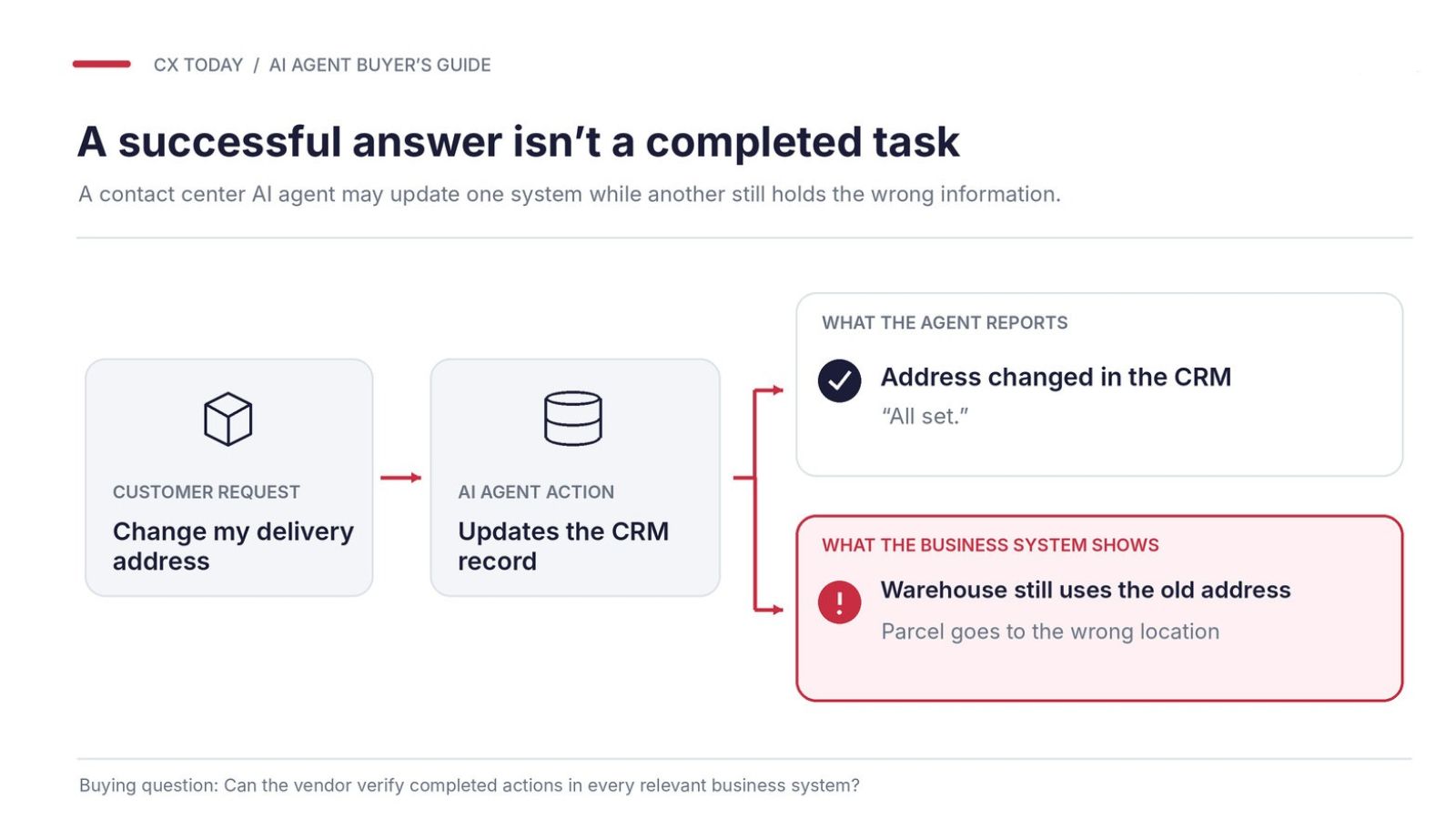
Imagine someone calls their bank to replace a card they lost, then they discover that the address on the account is wrong. An AI agent would probably have no problem handling that, as long as it’s configured to verify that user’s identity, check the bank’s rules, update the right systems, and arrange the delivery. One mistake along that path could send a card straight to a stranger.
AI Agent vs. Chatbot vs. Agent Assist
|
Technology |
What it really does |
|---|---|
|
Traditional chatbot |
Follows a script or decision tree |
|
AI-powered chatbot |
Responds more flexibly to queries |
|
AI agent |
Interprets, plans, and executes actions |
|
Agent assist |
Supports internal human employees |
How Do AI Agents in Contact Centers Work? The Basics
We’ve already covered the nitty-gritty details of AI agent architecture in this guide, so I won’t go too in-depth here. You probably know the basics already: perception and intent detection, reasoning, and the integrations and APIs that let agents act.
Now we’re getting even more plumbing to consider, from context graphs (which help agents understand why decisions were made, not just what data exists), to harnesses that coordinate the steps needed to complete a request, to Model Context Protocol (MCP) technologies standardizing connections to external tools.
In fact, Cisco’s Vinod Muthukrishnan told us at Webex One in 2026:
“It’s never been easier to build an AI agent. Anyone can do it. It’s never been harder to make it enterprise-grade.”
Which Customer Journeys and Tasks Should AI Agents Handle?
This is the smartest question to ask before you even start shopping, and we’ve already made the basic argument in this article: smaller steps are often best.
Just because customers are gradually becoming more accepting of AI agents doesn’t mean they expect to have to deal with them in every interaction. Sometimes, adding an agent to the mix just gives your customer another annoying gate to get through.
As Five9 CEO Amit Mathradas told us in October 2026:
“Consumers aren’t asking companies to choose between AI and people; they’re asking for both, done right.”
Start With Customer Outcomes, Not Automation Opportunities
Lots of things can be automated; fewer things should be. Bluecrest, for instance, found through interaction analytics that advisers were barely mentioning a key subscription product; targeted coaching fixed it, not automation. We’ve covered the full story already, but the point is sometimes you find a problem that requires a fix other than automation.
The AI Agent Task Suitability Scorecard
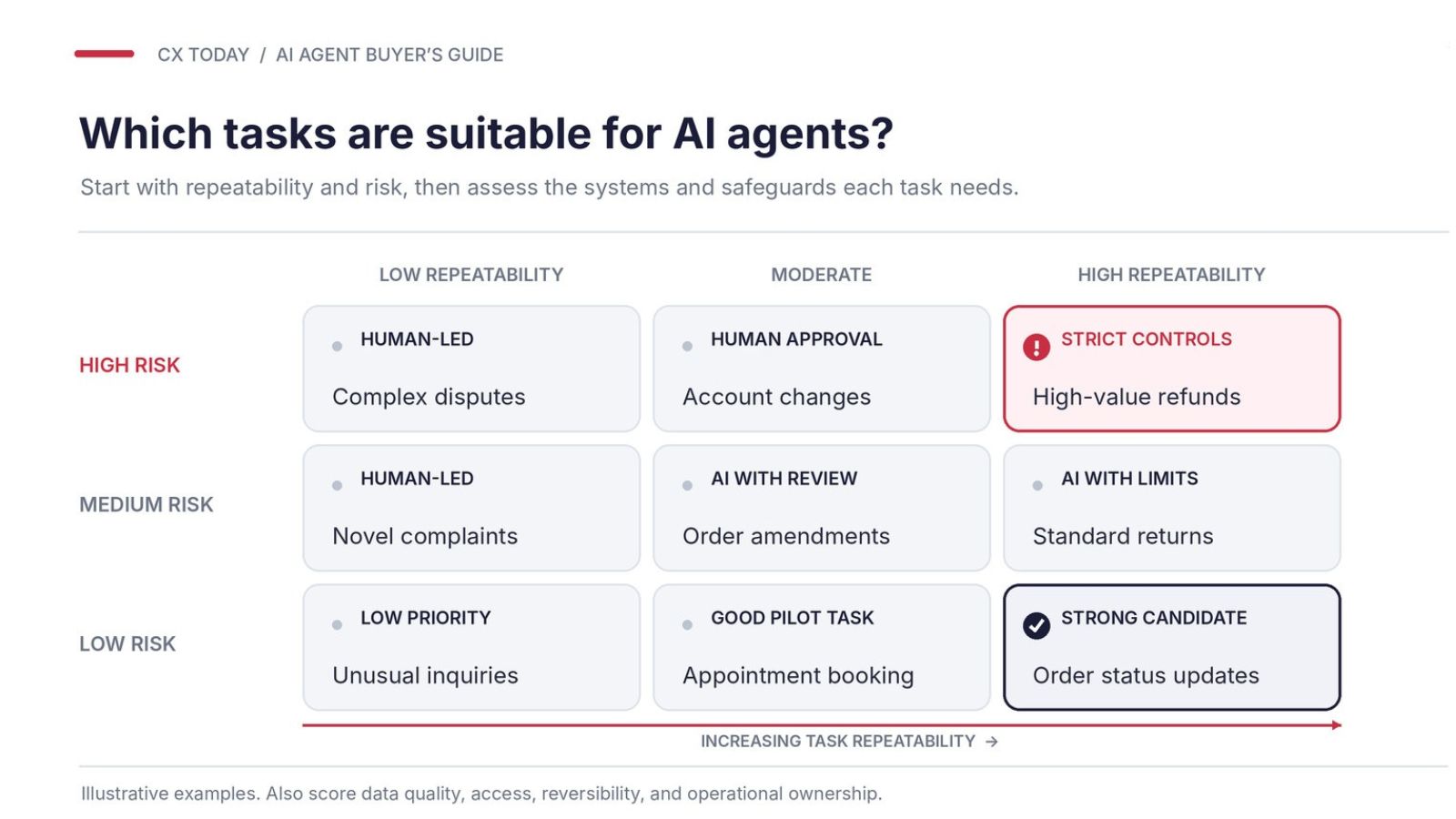
As tempting as it is to find the busiest customer journey and assign it straight to an AI agent, companies really need to show some discretion here. Take a list of workflows you might be keen to give to AI and score them against a few criteria:
|
Factor |
What matters |
|---|---|
|
Volume |
Number of relevant requests |
|
Repeatability |
Consistency of the process |
|
Data quality |
Accuracy of available records |
|
System access |
Ability to complete transactions |
|
Risk |
Financial, legal, or customer consequences |
|
Reversibility |
Difficulty of correcting mistakes |
Score each task from 1 to 5 or 1 to 10 (whichever suits you), then look hard at anything that ranks high on both volume or repeatability and risk. A task that’s easy to automate isn’t automatically worth the fallout if it goes wrong.
AI Agent Use Cases: Which Tasks are Best for AI Agents in a Contact Center?
Companies and vendors keep finding new ways to use AI agents in the contact center, so we won’t pretend there’s a single list of use cases that you’ll be sticking to for the next three years. Still, from what we’ve seen so far, the best opportunities share two traits. First, they’re tasks that would be too complicated for basic automation on its own, but not so complicated they cause new problems.
Second, they’re easy to plan for, repetitive, and carry minimal risk.
Common options we’ve seen include:
-
Agentic self-service: Essentially the next step up from conversational or generative AI bots for self-service. Agents can help with multi-stage issues like troubleshooting broadband problems, changing bookings, processing returns, or dealing with several account requests during one conversation. Travel management company Engine’s Eva agent is already solving more than half of travel cases without human intervention.
-
Proactive service: Agents can spot a delivery delay or service outage, contact affected customers, and arrange another appointment before everyone starts calling. Agents can also match callback requests with employee availability and customer preferences.
-
Live agent assistance and handoffs: Agentic copilots or colleagues can help with pulling together account details, suggesting actions, and helping employees find answers. When an automated conversation gets stuck, the AI can arrange a transfer with the customer's history and unfinished work attached. PenFed has already shown how a “Wingman” agent can prepare updates for employees and save them about 50% of after-call work.
-
Coaching and quality assurance: Agentic coaching bots can handle the process of reviewing conversations for everything from compliance problems to routine mistakes, and recommending or scheduling coaching sessions.
-
Ticket routing and case management: Not the most thrilling option, but still useful. Agents are great at prioritizing cases as circumstances change, identifying urgent complaints, and updating records. Compass Working Capital, for instance, is using Agentforce to direct customers to the right financial experts, arrange callbacks, and manage data entry, potentially saving 6,000 staff hours annually
Which Tasks Should Remain Human-Led?
Essentially, anything that requires the stuff only humans have: empathy, proper judgment, or the ability to resolve conflict. Also, anything that’s difficult to reverse. Think complaints someone’s going to have to apologize for, challenges that need creative problem-solving, or decisions that come with real accountability attached.
Even then, don’t make the mistake of thinking you can stop a customer from accessing human support. AI agents can stumble, and customers can get frustrated; a route to a person should always be available.
Gartner’s surveys have proven that, finding that 87% of customers still think access to a human is essential, even if they don’t mind using AI for the initial stages of their journey.
What Business Case Should You Make for the First Workflow?
Choose one journey, figure out how much it currently costs to handle, look at repeat-contact rate, and then check actual resolution performance. For instance, if you’re building an AI agent to handle a returns workflow, compare completed refunds against total operating costs, and include the exceptions that end up getting transferred to a human anyway.
Also check whether customers end up contacting the business again afterward, then use our AI agent ROI guide to figure out how you’re going to prove the case paid off.
Should You Build, Buy, or Embed Contact Center AI Agents?
We’ve covered this conflict a few times, occasionally getting a few valuable insights from friendly vendors, but there’s still no definitive answer.
Pets at Home built its own digital pet-care platform in 2026, simultaneously using established software like Salesforce for other parts of the business. The Head of AI Transformation and Enterprise Architecture, Simon Ellis, gave some useful advice in June 2026:
“Buy the commodity, integrate, build the differentiation.”
That’s probably the most sensible approach for a lot of companies. Still, if you want a quick analysis:
|
Approach |
Where it Makes Sense |
What Could Cause Problems |
|---|---|---|
|
Buy specialist agents |
When you want a specific tool for automating a certain part of customer service, without hiring a development team |
Integration costs, vendor restrictions, and limitations on customization |
|
Build your own |
When you have unusual workflows, specific business logic, and the right expertise |
Development costs, security testing, and the long-term maintenance burden |
|
Embed in existing platforms |
You’re already using CRM and CCaaS with AI agents, and you want those agents to have instant access to your data |
Extra licensing fees, limited flexibility, potential vendor lock-in |
|
Use a Mixture |
You want more control over certain parts of the stack without building everything |
Overlapping costs, additional latency, and possible confusion over ownership |
Most companies will probably end up using a blend, and what that blend looks like depends on your existing technology, how much control you need, and who handles maintenance once the consultants have left. Just remember that buying isn’t always the simplest option, and using your existing platform isn’t always the cheap route it appears to be, particularly if you end up locked into a specific set of tools.
The choice is widening, too. Microsoft’s Contact Center Intelligence, introduced in 2026, lets companies bring Microsoft’s AI into their existing CCaaS environments without ripping out telephony and routing.
Is Your Knowledge, Data, and Process Ready for AI Agents?
AI agents for CCaaS rely on existing contact center software, customer records, knowledge bases, and transactional systems. You don’t just buy an agent and throw it into the void.
Well, technically you could, but that probably wouldn’t end well.
Most companies aren’t nearly as well-prepared as they think. NTT DATA’s October 2026 research, covered by CX Today, found that 52% of companies are still struggling with legacy system integration, and 40% are still tackling data privacy and security concerns.
As Martin Hill-Wilson, Owner of Brainfood Consulting told us in February 2026:
“You really can’t busk this stuff.”
Is Your Knowledge Reliable Enough for an AI Agent to Act On?
Having a knowledge base, and having one an AI agent can use correctly, are two different things. If you’re running a retail company and you change the window for returns from 30 days to 14, you can update your website to say that. Your human agents will probably know about the change too, but your AI agents might still be drawing from the old policy, or worse, trying to decide which one still applies.
Context graphs can help by connecting customer records, policies, and the reasoning behind earlier decisions. Still, they won’t instinctively resolve contradictory policies or establish which exceptions employees, or AI agents, can really make.
Can the Agent Access the Right Data and Systems?
The whole point of AI agents in the contact center is that they should be able to act, which means accessing your systems just like a regular employee. An agent might be able to link to your CRM, but that doesn’t mean it can complete a transaction.
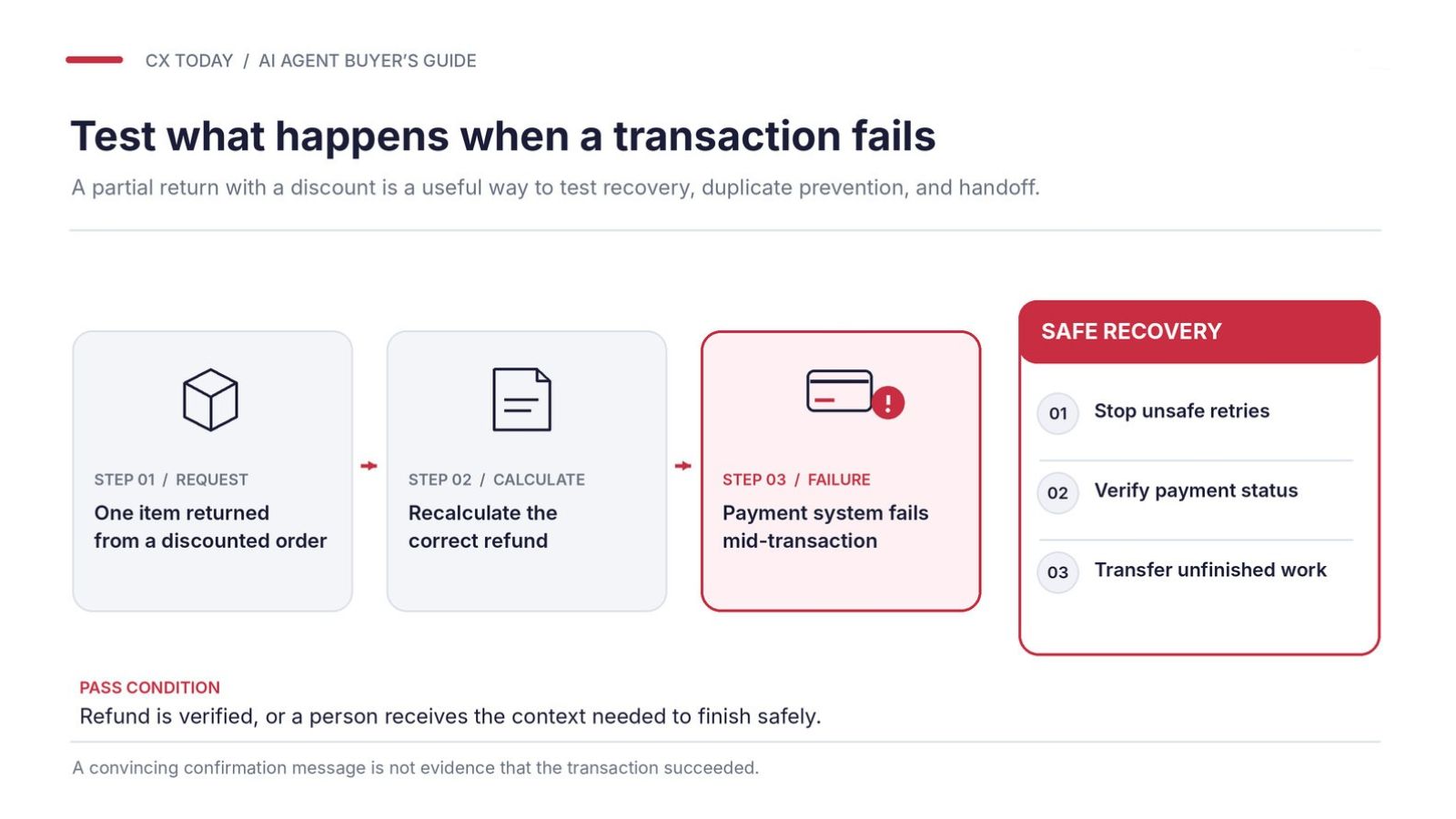
Billing agents should know what’s already happened before they try sending a refund or changing a payment method. Make sure your systems can share current information, confirm what’s been done, and recover from failed requests. Also set the permissions carefully: who the agent can act for, what it can change, and what kind of information it can retain after the fact.
Are Your Existing Processes Ready for Automation?
Most companies think the automatic answer to this is “yes”, but a process that seems easy to automate for you can have a lot of tricky points. For instance, when an employee makes an exception to a company policy, if that decision’s recorded in someone’s inbox and nowhere else, that makes the process a little more complicated.
Approval limits, unusual requests, and escalation rules need documenting, and someone needs to own the agent after launch. Who updates the knowledge base, and who runs additional tests?
Are You Prepared for When Something Goes Wrong?
Plenty of vendors let companies set guardrails for AI agents, monitor their performance (and their mistakes), and even track things like drift, hallucinations, and bias. Having all of those things set up can help, but it doesn’t mean you’re fully prepared for what happens when something really goes wrong.
The UK’s Competition and Markets Authority was pretty clear about this in March 2026: businesses remain responsible when their AI agents breach consumer protection law, even if another company supplied the technology. The EU has requirements to consider too, with relevant AI Act transparency obligations, including informing people when they’re interacting with AI, applying since August 2, 2026.
That makes operational ownership rather important. Someone needs to approve policy changes, investigate mistakes, and have the authority to stop an agent before it causes more problems. Our agentic CX guide digs into exactly who should hold that authority, and the operating model behind it, if you need more detail here.
The Pre-Demo AI Agent Readiness Checklist
Before browsing through vendors, check:
-
Workflows: Are the suggested customer journeys documented and approved for automation?
-
Knowledge: Who owns policies, resolves contradictions, and approves exceptions?
-
Data and context: Can the agent access current records, relevant customer history, and previous decisions?
-
Integrations: Can business systems complete actions and confirm their outcomes?
-
Permissions: Are identity checks and transaction approval limits defined?
-
Privacy: What customer information can external providers access and retain?
-
Exceptions: Are failed transactions and unusual requests covered by documented procedures?
-
Measurement: Do we have baseline performance figures and real conversations for testing?
-
Ownership: Who maintains the agent and approves changes?
-
Recovery: Can we stop automated actions and safely transfer unfinished work to employees?
Based on those answers, you can identify where you are in the readiness timeline:
|
Readiness status |
Recommended next step |
|---|---|
|
Ready to evaluate |
Core data, permissions, integrations, and ownership are documented. Start vendor evaluation. |
|
Fix before deployment |
Specific gaps can be addressed during procurement, with assigned owners and deadlines. |
|
Stop and resolve |
Critical security controls, transaction safeguards, or authoritative records are missing. Resolve these before live deployment. |
How to Compare AI Agent Platforms: Vendors, Features, and Criteria
Trying to make sense of the contact center AI agent vendor market right now is something of a headache, even with the opinions of analysts like Gartner to guide us.
Practically everyone has an agent, everyone promises better resolution rates, and everyone seems convinced their platform should be running your entire customer service operation. All the while, the ecosystem keeps changing. Salesforce bought Fin, Zendesk bought Forethought, and Microsoft, as we said before, is offering AI capabilities to contact centers not even using its CCaaS platform.
That makes it increasingly difficult to figure out which products are genuinely different, which features you need (and which you’re already paying for), and how you’re going to stop your stack from becoming overwhelmingly complicated.
Simon Hayward, VP of Sales EMEA at Freshworks, told us in August 2026:
“Businesses are budgeting for the AI capability itself and underestimating everything it takes to make that capability work inside their existing environment.”
We can’t really give you a definitive ranking here, but we can help you get a better idea of how you should be viewing the market.
Five Main Types of AI Agent Platforms
The build, buy, embed, or use a combination question should have helped you narrow this down a little, but there’s still a fair bit of overlap. So, here’s the quick rundown:
|
Category |
Vendors to investigate |
Where the advantage is |
What I’d question |
|---|---|---|---|
|
CCaaS-embedded AI |
Genesys, NiCE, Five9, Talkdesk, Zoom |
Pre-built voice, infrastructure, routing and supervisor tools. |
What can the AI actually do, and how much can you customize? |
|
CRM and service-suite AI |
Salesforce, Microsoft, Zendesk, ServiceNow |
Access to your workflows and records |
Will it work properly with your existing contact center, and do you need extra licenses? |
|
Specialist AI agents |
Parloa, Cognigy, Sierra |
Extensive customization and dedicated technology |
How much integration work is necessary, and who maintains everything? |
|
CPaaS and orchestration |
Twilio, Vonage |
Flexibility for connecting communication channels to different technologies |
How much of the actual agent experience will your team have to develop? |
|
Development and model platforms |
Google Cloud, AWS, Microsoft Azure |
Exceptional control over models and deployment |
Do you have the engineering expertise to support what you build? |
As I said before, don’t assume your existing supplier is automatically going to be the easiest or cheapest choice, and don’t assume that every capability a vendor might be promising is immediately available to you.
Look at Dialpad, for instance: the company constantly promises new updates to its agentic contact center, and most of the time it delivers, but not always to the same customers at the same times.
The Essential AI Agent Platform Evaluation Criteria
Once you know what types of vendors you’re going to be looking at, then you need to think about what matters in terms of performance. Lots of suppliers make similar claims, like 80% automated resolution, for instance, but one could be handling straightforward delivery questions while the other’s dealing with refunds: very different stakes.
Here’s the AI agent evaluation checklist worth working from: