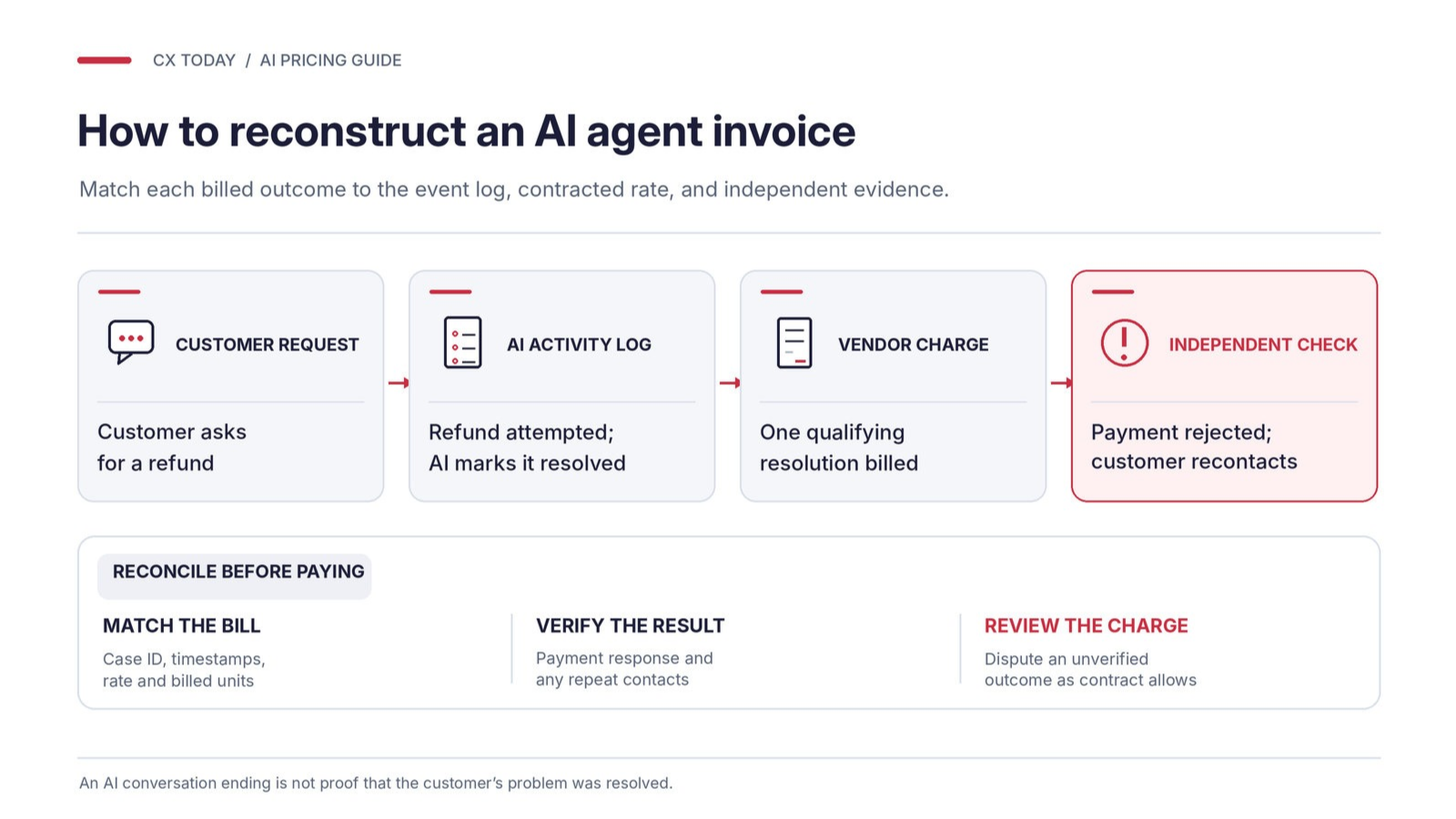


AI agent pricing models have made the already not-so-fun task of budgeting for a contact center way more complicated. It used to be that you’d pay per agent, per month, for a platform, add a few premium extras, and generally have a pretty good idea of what your bill would look like at the end of each quarter.
Now AI agents are priced by the minute, message, conversation, action, credit, token, or apparent ‘resolution’; sometimes bundled into human-agent licenses, sometimes as a separate consumption charge.
It’s not exactly surprising that Gartner found AI spending rose more than 38% in Spring 2026, even though overall budgets only grew 2%.
Zeus Kerravala, Founder and Principal Analyst at ZK Research, told us transparent consumption pricing is an absolute must:
“You need to be able to provide customers clarity that if I run these types of transactions, here’s the cost. Perhaps if you do it this way, it’s going to be cheaper.”
Transparency is shockingly hard to come by, though, so the detective work falls to you.
Fortunately, we’re here to help.
Key Takeaways:
-
Unit prices don’t mean much if you don’t know exactly what creates a billable event.
-
Credits, peak volumes, and workflows with multiple steps can easily change your bill.
-
The full operating cost might include work and charges that don’t show on a rate card.
-
The most valuable measure is what you spend to resolve a customer issue properly, and you need an agreed way to verify the result.
The simple advice? Don’t pick a pricing model until you really know how to translate a vendor’s meter into what you’ll pay to get a customer’s problem fixed.
Why is the Old Unit of Purchase Breaking Down?
It’s probably not a case of vendors deliberately trying to make budgeting harder. Everyone just has different opinions about what companies should be paying for, and frankly, they’re still working it out.
Salesforce, for instance, started off charging $2 per conversation for Agentforce, which made sense for a customer-facing agent handling straightforward support queries, and much less sense once that agent was updating CRM records, supporting employees, or generating quotes.
So, naturally, Salesforce had to switch things up, introducing Flex Credits at $500 per 100,000 credits, with a standard action consuming 20 credits (around $0.10). There’s still conversation-based pricing too, plus pay-as-you-go, pre-commit, and pre-purchase arrangements.
As Bill Patterson, then EVP of Corporate Strategy at Salesforce, said:
“This model doesn’t charge for small talk or general fluff like: ‘How was your day?’ It charges based on the actual work performed by the agent, what we call ‘taking action’.”
Microsoft’s been dealing with similar changes. Nearly 60% of its customer service customers were buying usage-based credits by April 2026, so it moved to a hybrid model, which Microsoft CFO Amy Hood explained, saying:
“It will still have that per-seat license logic, but it will also have a meter, just like you see in Azure.”
Like it or not, contact centers have become the testing ground for enterprise AI economics, so buyers are left comparing products with entirely different units of measurement. No wonder CFOs are struggling.
The Six AI Pricing Models CX Leaders Will Encounter
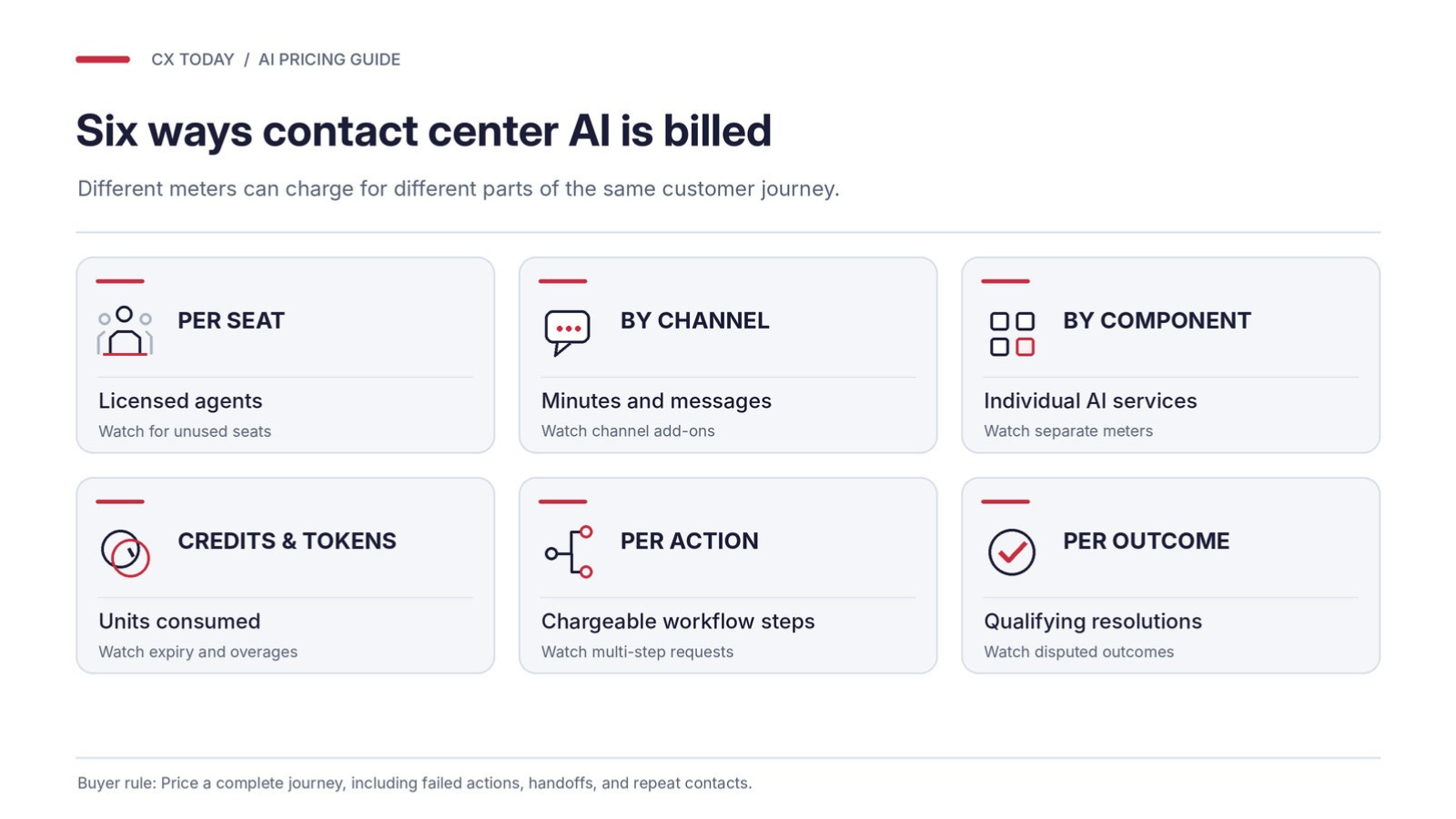
More models will appear; the experiments aren’t over. Nobody seems particularly certain of anything, other than that companies are going to have a tough time planning.
As Simon Hayward, VP Sales EMEA, Freshworks, told us:
“Businesses are budgeting for the AI capability itself and underestimating everything it takes to make that capability work inside their existing environment. None of that shows up in a vendor proposal, so it gets treated as a hidden cost rather than something organizations plan for from the outset.”
1. Per-Seat Pricing and Bundled AI Entitlement
Per-seat is the cozy territory, because it’s what we all know. Genesys Cloud CX, for example, sells named-user packages ranging from $75 to $240 per user, per month on an annual commitment. Its CX 4 plan includes 30 AI Experience Tokens per named agent each month, while all plans include a smaller organization-wide allowance.
Microsoft’s Dynamics 365 Customer Service Premium takes the same hybrid route: 1,000 monthly Copilot Credits per user, pooled tenant-wide.
It works for contact centers with steady staffing: finance knows the base bill, and AI comes inside the contract. The trouble starts when AI takes on more work, and you’re paying for human licenses you barely use alongside extra AI capacity.
2. Channel-Based Consumption Pricing
Amazon Connect keeps the billing fairly straightforward at first. There’s no mandatory seat license or long-term minimum commitment. Instead, the U.S. rate card lists $0.038 per voice minute, $0.010 per chat message, $0.080 per email, and $0.014 per SMS or third-party messaging message.
Some AI capabilities are already included, from self-service agents to conversation summaries. Others aren’t. Telephony and third-party fees also land on top of those channel rates.
Still, Kerravala thinks Amazon is one of the more disruptive forces in contact center economics:
“Historically, this has been a market that has lived by per seat per month pricing. For any kind of seasonal business that’s not optimal.”
A retailer whose volumes between Thanksgiving and Christmas outstrip the rest of the year can see his point; paying for peak capacity every month is hard to justify. Individual charges accumulate, though. A ten-minute voice call costs $0.38 at the listed platform rate before telephony. Worth calculating before anyone celebrates the absence of seat fees.
3. Component-Level Usage Pricing
Google Cloud is pretty specific with its usage-based pricing: Conversational Agents charges $0.007 per chat request for Flows and $0.012 for Playbooks. Voice is metered at $0.001 or $0.002 per second, respectively. Agent Assist and Conversational Insights have their own charging structures.
Predicting the monthly total is hard, and comparing options is harder. Even the way you build an AI agent affects what you pay. Google’s own pricing documents show a five-turn chat costing $0.04 when four turns use Flows, and one uses a Playbook. But when a Playbook calls a Flow, all five turns are charged at Playbook rates, bringing the cost to $0.06.
It suits companies already on Google Cloud that want to pay for individual capabilities rather than a whole platform.
4. Credits and Tokens
If you’ve used ChatGPT or Claude, credits and tokens will feel familiar, and they’ve become the middle-ground option for Salesforce, Microsoft, and others.
Genesys also uses AI Experience tokens (soon to become units) for certain features like predictive routing or virtual agents, and Arpita Maity, Director of Product Marketing AI at Genesys, explained:
“By paying only for the AI functionalities you actually use, tokenization offers a scalable, cost-efficient way to integrate AI into your operations.”
There’s an appealing amount of freedom here, but also plenty of scope for an ugly invoice. Voice interactions might use more credits, unused allowances can disappear, and teams can rack up charges simply by switching on features without checking the rates.
5. Action-Based Pricing
Action-based pricing is credits with a sharper focus: it charges when an AI agent does something across your systems. Salesforce’s Flex Credits charge 20 credits for a standard action and 30 for a voice action. Similarly, HubSpot charges 10 credits per AI action executed in a workflow.
Straightforward, until you count the actions in one request. A refund might mean checking an order, retrieving a policy, updating a record, initiating a payment, and following up. Each one hits the bill, so ask vendors to price a complete journey before you agree to this model.
6. Outcome-Based or Per-Resolution Pricing
Potentially the most appealing model, with caveats: you pay for work that actually gets completed. Kerravala told us about one customer pushing the idea to its logical end:
“I talked to one company, an NBA team, that they’ve negotiated: I’m only going to pay the vendor for agents that complete the tasks.”
Quite a few companies are exploring this model now. We’ve got Zendesk, publishing a price of $1.50 per committed automated resolution or $2 with pay-as-you-go, after the included allowance on eligible plans. Its AI agents are included with qualifying Support and Suite plans, although entitlements and billing rules depend on the customer’s arrangement. Intercom’s Fin uses an outcome-based fee too.
The trouble is the outcome you’re being charged for might not be the same as the outcome you want.
Which AI Pricing Model Fits Your Contact Center?
|
Model |
Charge trigger |
Cost growth |
Financial risk |
Best fit and watch-out |
|---|---|---|---|---|
|
Per seat |
Licensed users |
Seats and extras |
Mostly buyer |
Stable teams; unused licenses |
|
Channel |
Minutes/messages |
Contact traffic |
Buyer |
Seasonal demand; separate meters |
|
Component |
Individual services |
Features invoked |
Buyer |
Technical teams; fragmented bills |
|
Credits/tokens |
Units consumed |
Consumption rates |
Buyer |
Multiple AI tools; credit expiry |
|
Action |
Chargeable steps |
Workflow complexity |
Buyer |
Task automation; multiple charges |
|
Outcome |
Qualifying results |
Billable successes |
Shared, contract-dependent |
Repeatable requests; disputed resolutions |
No universal winner, then. If you’re still piloting, don’t sign a large upfront commitment; pay-as-you-go with spending alerts and a hard cap gives you something to test. Enterprises running several AI tools can consider pooled credits, but insist on a usage simulator built on your historical data first.
How Does AI Agent Pricing Change as Contact Volumes Grow?
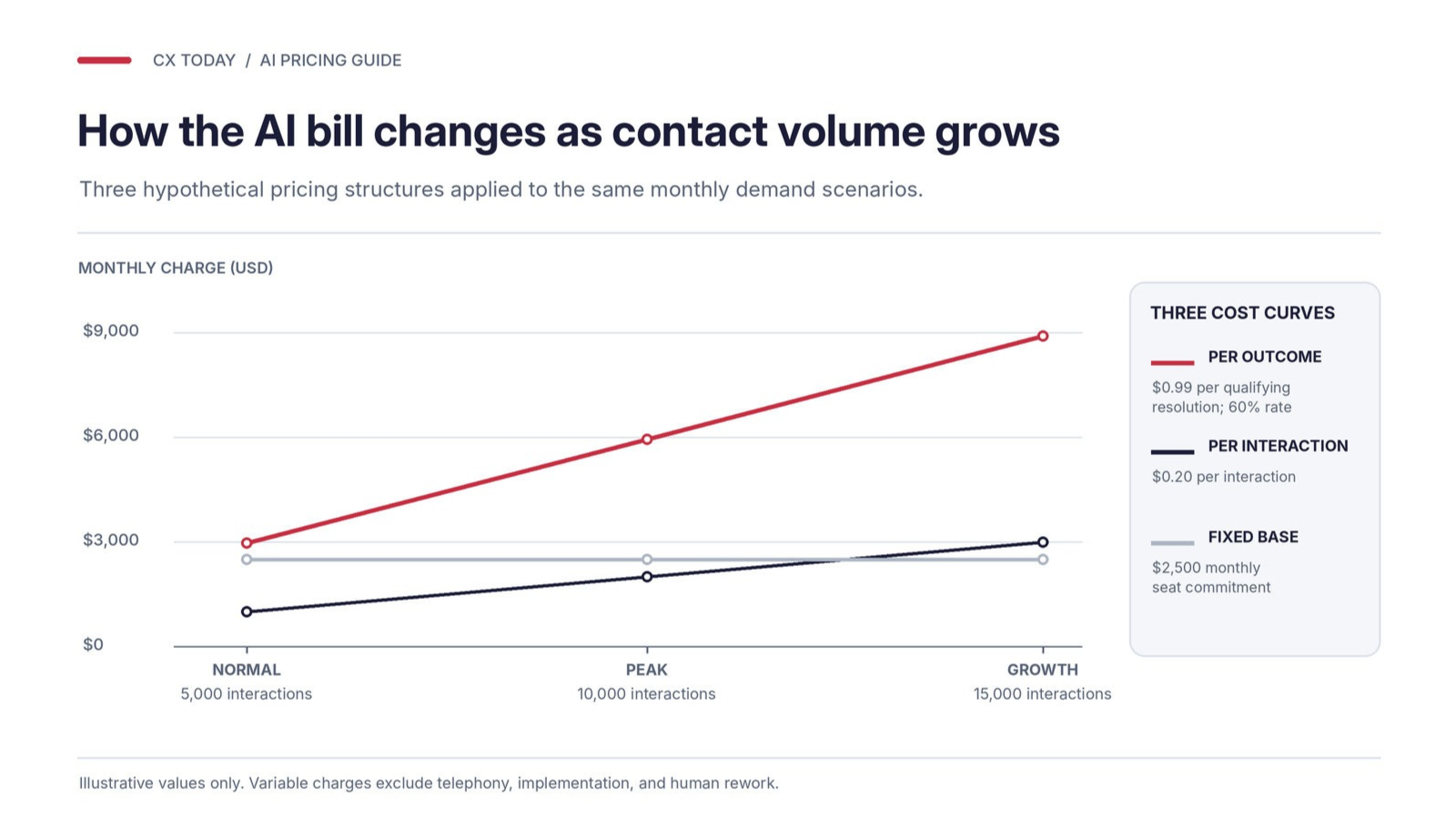
None of these models gives you certainty, because demand changes throw the whole thing off. So test three scenarios:
-
Normal demand: Your usual monthly contact volumes, including average actions, minutes, and credits consumed per interaction.
-
Peak demand: A service outage can flood your voice AI with simultaneous calls. The monthly forecast might look perfectly manageable while peak capacity gets expensive.
-
Growing demand: Adoption isn’t the only thing to watch. AI agents are taking on more complicated work, and customers could soon have their own agents contacting your business. That’s another source of demand to price in.
Some companies are offering tools to help with this, like Microsoft with its Dynamics 365 AI credit estimation tool, which can connect contact forecast to expected credit consumption, with projections by channel, queue, and time interval.
Calculate Your Cost Per Verified Resolution
Once you’ve got your scenarios, calculate your cost per verified resolution for each. You’ll need two calculations:
-
Vendor cost per verified resolution: Attributable vendor charges divided by verified resolution
-
Fully loaded cost per verified resolution: Total attributable operating costs divided by verified resolution.
An illustrative example, assuming the same request mix throughout, a 60% independently verified resolution rate, a hypothetical $0.20 per interaction, and a hypothetical $0.99 per qualifying resolution: