
As much as the majority of television advertisements seem designed solely to annoy viewers, sometimes you have to take your hat off to the people behind them for hitting just the right note. Those Ronseal ads with the strapline ‘it does exactly what it says on the tin’ fall into that category because, let’s face it, we all appreciate a product which does exactly what it says it should do.
RingCentral Live Reports is what we might now call a Ronseal product - you don’t need to be an expert at cryptic crosswords to work out what it does, it is right there in the name. Just for the sake of complete clarity, it is a call analytics software platform which provides - you guessed it - real time reporting on call management and performance.
Live Reports is not a standalone product, but is offered as an optional extra as part of the RingCentral Office hosted cloud PBX. As historical analytics is bundled in with the Office platform, Live Reporting does not concern itself with data storage and long term analysis. Its focus is purely and simply in-the-moment visibility, providing management, supervisors and agents with graphical dashboards outlining how individuals, groups and the whole team is performing against key metrics for call quality and service.
In this review, we will assess whether this kind of focussed, modular approach to in-play insight offers any particular benefits to call management, as well as looking in detail at exactly what RingCentral Live Reports can do.
Please note, UC Today does not have any role in the sale of any product. Our reviews are entirely independent and aimed only at helping our readers make informed choices with their UC product purchases. If you're researching call reporting for the first time, try our call analytics 101 buyer's guide for guidance on what you need to know before purchasing.
How Does It Look?
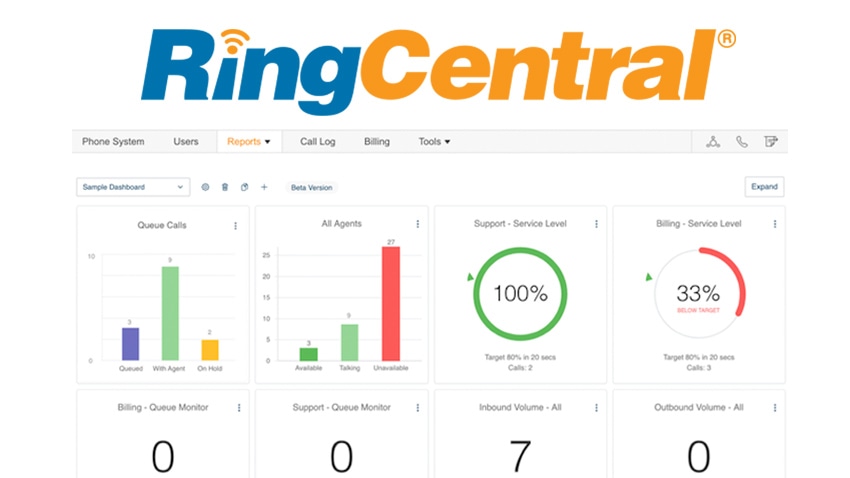
The Live Reports GUI is built around a number of ‘widgets’ displaying the relevant performance metrics. These are a mix of text and numerical data, plus graphic charts and visual markers. The overall layout is very simple, clear and easy to scan, with good separation between objects and a simple colour palette on a plain white background ensuring everything is very easy to read.
What Can It Do?
Live Reports is an additional hosted service available as part of the RingCentral Office cloud phone system. It provides real-time reporting on inbound and outbound calls. Measuring and analysing data from the PBX system, performance metrics are displayed on graphical dashboards for easy visibility and interpretation.
Information is displayed in ‘widgets’, with seven categories available:
- Service level
- Call volume
- Agents Count
- Agents Details
- Queue Monitor
- Queue Details
- Queue Calls
These can be added to or taken off the dashboard simply by dragging and dropping from a menu, so the interface is fully customisable according to what the user wants to display.
In addition, each of reporting categories can also be further customised, giving more than 30 different metrics to display overall. For example, Service Level reporting can be customised by setting a call answering threshold in seconds, and a percentage target for the number of calls answered within that time. You can also define different SLAs for different queues or teams, with different targets and thresholds.
Overall, Live Reports is designed to give supervisors a clear picture of call handling and performance as they go along. This includes oversight on agent performance, with analysis of calls taken and availability times, but also the ability to make strategic comparisons between call volumes/queue data and agent activity so staffing levels can be adjusted. The idea is to give supervisors a means of spotting trends as they happen, so they can respond as quickly as possible.
Access to the dashboards can also be given to agents, either by connecting to an external wallboard display or by changing privacy settings so they are visible to other users. Full access to the platform, or ‘ownership’, is available via a user license, which gives full permissions to create and amend dashboards. Licenses need to be purchased by any live reports admin or person being monitored (not just admins).