
As a rule of thumb, Mitel is viewed as a pretty safe bet for business telecoms solutions. There is something for everyone in the US developer’s giant portfolio, from cloud communications to end point hardware, meeting the needs of the smallest micro-businesses right up to global enterprises.
The release of MiVoice Office Application Suite 5.0 has been hotly anticipated at the SME end of the company’s customer base. On the surface it is essentially an upgrade of the Mitel Communications Service (MCS) server platform behind the hugely successful Mitel Phone Manager app.
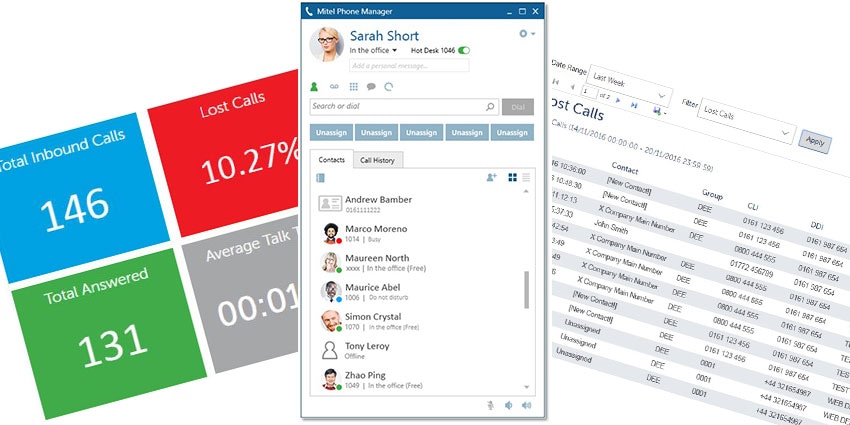
But dig a little deeper and MiVoice Office 5.0 quickly starts to feel like more than an upgrade. What tweaks there are to the features available in Phone Manager are just part of a much bigger whole, a whole which combines Phone Manager with MiContact Centre Campaign Manager and adds two new applications, MiVoice Office Call Reporter and MiVoice Office Call Recorder.
So MiVoice Office 5.0 is actually four applications in one, all run from a single server to reduce hardware requirements and create greater integration of communications functions for Office 250 customers.

So what does this extension and closer unification of functions mean for MiVoice Office 250 users? What practical differences does it make to deploying and accessing UC platforms compared to Phone Manager alone?
How Does It Look?
Mitel uses familiar interface layouts and branding for all four applications in the 5.0 suite. Phone Manager and Campaign Manager are of course existing modules, so the desktops remain more or less the same in appearance, with Call Reporter and Call Recorder following similar themes.
The interfaces are branded mainly in blue, with a navy blue Mitel branded banner at the top of the page, and lighter shades used for buttons and text, along with greys and greens.
Phone Manager strikes a good balance between the use of text and icons, with main PBX functions like voicemail, dial pad, call forwarding and contacts accessed at the top of the screen. Clicking these opens up new options in the main body of the window, again using symbols well, for example to differentiate between different categories of contact.
Campaign Manager presents a main Campaign Dashboard, with menu options provided by tabs in a horizontal ribbon and a campaigns directory to the left of the screen. Campaign statistics and information is displayed in the main body of the window underneath the tabs. Call Reporter and Call Recorder follow broadly the same layout.
What Can It Do?
With four distinct platforms available, the full range of functions available through MiVoice Office Application Suite 5.0 is considerable. However, which of these can be accessed depends on the licence purchased - all four can be deployed on a single server, with different subscription options available.
The Phone Manager app has itself changed little. There is a new conferencing option on the main call banner and that is about it. Otherwise, is offers all of the functions typical of a software based PBX and UC platform - a contacts directory, call history, voicemail, chat and voice conferencing, with additional features such as auto attendants, automatic call distribution and hot desking.
There is a softphone built into the app for delivering voice and text communications and a mobile client for iOS and Android, allowing full access from a smartphone. In addition, MiVoice Phone Manager is CRM enabled, allowing it to be plugged into platforms like Salesforce and used as a communications app within the CRM software.