

We thought it would be useful to create a short call reporting buyer's guide. If you're researching call logging software providers be sure to visit our market guide directory.
What is Call Analytics?
Let's start by identifying call analytics. Call logging systems have been around since the days of the earliest PBX telephone system.
In the past, these solutions were often described as "call accounting" systems, or "call loggers". As time moved on, their name evolved and changed, to "call reporting software", or "call analytics".
From relatively simple beginnings, call analytics has come a long way. Now, it has the ability to help companies analyse their data more accurately than ever (hence the trendy new name). Call reporting solutions connect to your phone system (also known as a Unified Communications platform or IP-PBX), and are software-based. They can securely collect and store the data records of all calls made and received.
CDR Records
The majority of telecom systems and providers are able to output text-based telephone records for each call made and received. The resulting information is known as a "Call data record", or CDR. Without your CDR, you'd never get a phone bill for the calls you make.
CDR records are issued from your system or provider each time a call finishes (terminates). The format of these records can differ for each brand of phone system, though most follow a similar format.
When you receive a phone bill and it shows an itemisation of your calls, these are CDR records.
SMDR Records
SMDR seems complicated, but it's actually very similar to CDR.
SMDR stands for "Station Message Detail Record". Essentially, it's a record of the message details in your communications. The only difference is that SMDR records are linked to specific phone systems because they output the extension number or "station" with the call details.
Additionally, with SMDR, you may see a collection of other information, such as whether you made an "internal" or "external" call, what the account code was, or what the DDI digits dialled were. Example:
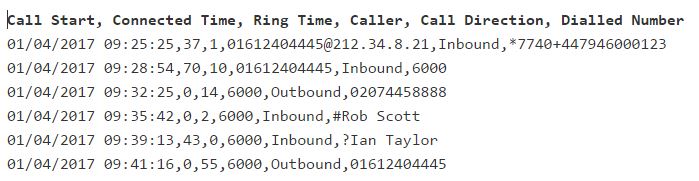
Traditionally, this solution was used in hotels to help them charge calls back to specific rooms.
How does Call Reporting Technology Work?
So, how does call reporting work?
Often, call logging software systems collect the call data records (CDR) from your phone system and then store them in a database. Using a software-based interface, companies can then view their call records in a functional, intuitive format.
Depending on whether your phone system is cloud-based or installed locally in your office, you may access your call reports in different ways.
Call Reporting Software Features
Call reporting software often includes a collection of "key features". However, it's worth noting that most call logging software vendors will offer a range of license options. The more features you require, the more you can update your service. For instance, if you have a contact centre that requires detailed ACD agent information, you may invest in a premium-level licence
Some of the key features that you might expect from any standard-level call reporting software include:
- Historical Reports - ability to report on your data by date and time. Report types vary, see common reports.
- Real-Time / Live Reports - a real-time view of today's call activity.
- Contact Centre (ACD) Dashboard - detailed agent reporting for contact centre environments
- Reporting Scheduling - receive reports by email in your chosen format (.CSV, .XLS, .DOC, .PDF)
- Fraud Management - toll fraud detection and alerts. If unusual call traffic is detected the software will try to alert you of the potential issue.
- Integrated Call Recording (normally extra cost) - many systems nowadays have the ability to play the recording from the call reports, very convenient.
Common Historical Reports
Here are some examples of what you might expect to find in common call reporting software programmes.
Inbound Call Reports
- Total Inbound Calls
- Time to Answer
- Service Level %
- Lost Calls (& Unreturned Lost Calls)
- Calls by Extension / User / Agent
- Calls By Group or Department
- Calls by DDI Number
- Average Wait Time
- Longest Waiting
- Average Talk Time
- Calls by Customer
Outbound Call Reports
- Total Outbound Calls
- Calls by Extension / User / Agent
- Call Attempts (dialled but not answered)
- Call Disposition Codes (call outcome codes)
- Average Talk Time
- Campaign Tagging
- Calls by Hour
Contact Centre Agent Reports
- Calls by Agent (Inbound/Outbound/Internal)
- Agent Status Activity
- Time on Duty
- Talk Time
- Idle Time
- Calls Refused
Common Real-Time Call Statistics
Just as important as historical reports, real-time call statistics enable businesses to manage things as, and when they happen.
For instance, real-time call statistics can be displayed on a live wallboard, mounted within an office. This wallboard can show real-time call activity that informs supervisors and business leaders of what's going on in the company. Additionally, these live updates can help staff to self-regulate and manage their output based on the Key Performance Indicators (KPIs) set by their peers.
Real-Time Call Statistic examples:
- Calls Queuing
- Calls made & received
- Service Levels
- Wait Times
- Individual User Activity i.e talk time, calls handled
- Lost Calls
- Calls Inbound by Business Number
On-Premise versus Cloud Call Analytics
Similar to many other software-based platforms which began with an installation on a local server within an office, call reporting software is now accessible on the cloud.
Usually, the system you can access will depend on whether your PBX or phone system is located in your office or hosted in a data centre (cloud). Call reporting software vendors have adapted their software to accommodate most deployment models.